Communications
Every Flow Council has built-in chat so operators and projects can stay in sync without leaving the platform. Open it from the Communications page of the launchpad.
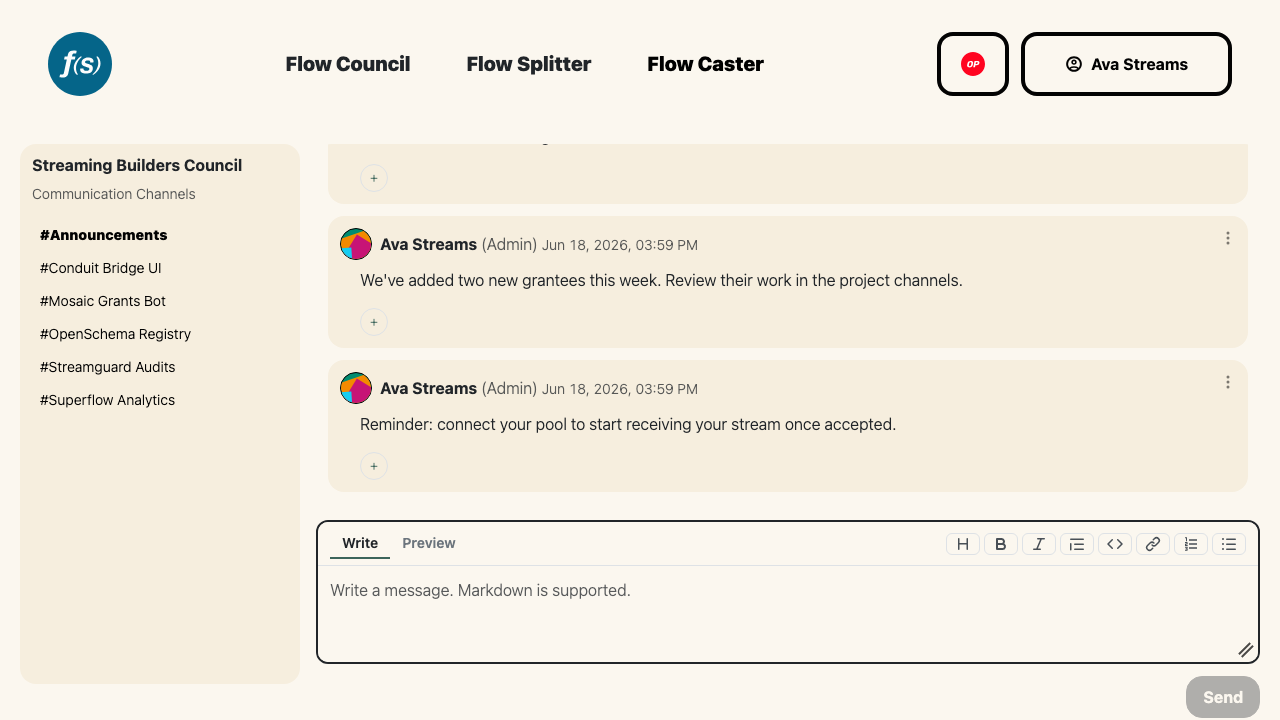
Per-round and per-project channels with a markdown composer.
There are two kinds of channels:
- Announcements – a council-wide channel for broadcasting updates to everyone in the round. Council admins post here; all members can read it.
- Project channels – one private channel per project, shared between the project's team and the council's admins.
Pick a channel from the sidebar to start reading. Sign in with your wallet to participate—you'll only see the channels you have access to.
Sending messages
Type into the message box and send. Markdown is supported, so you can format updates with headings, lists, and links. You can edit or delete your own messages afterward.
Pinning
Admins can pin a message to keep important context at the top of a channel—handy for round timelines, links, or recurring instructions. Pinning and unpinning are moderator actions; pinned messages are flagged so everyone can spot them.
Reactions
React to any message with an emoji. The reaction set is fixed—a small, curated list rather than a full picker:
👍 ❤️ 🎉 🙌 🌊 🦫
Click an emoji to add your reaction; click it again to remove it.