Council Membership
A Council is the set of wallet addresses that may cast votes in a Flow Council round. The round administrator defines a voting policy when a round is created:
- Who can vote – a member list of Ethereum addresses
- Vote budgets – the maximum number of votes each member can cast—set individually or globally
- Max Vote Spread – an optional rule that caps how many distinct recipients a voter may support, encouraging more focused allocations
Council admins (and anyone granted the Voter Review role) can update membership and the voting policy anytime from the Membership page of the Flow Council launchpad. All membership changes are written onchain; large updates are submitted in batches.
Voter Groups
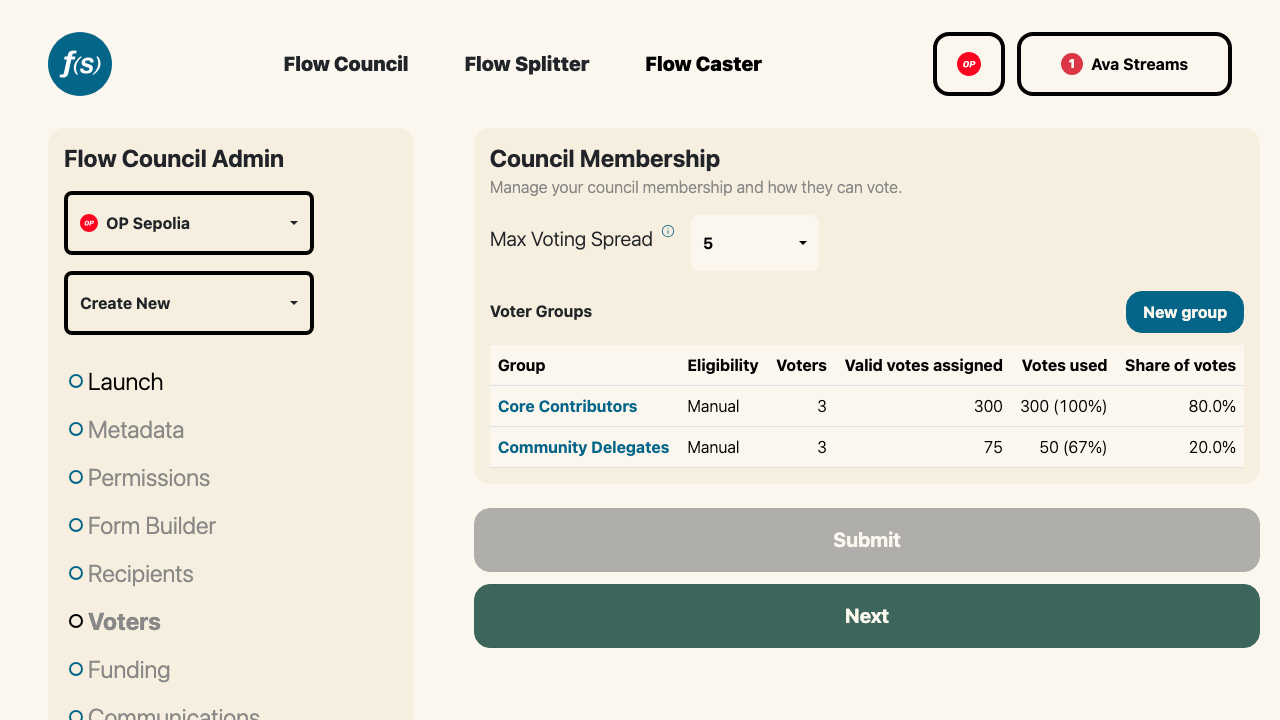
Voter groups and their share of votes.
Membership is organized into voter groups. Each group has an eligibility method that determines how addresses join it, and a default vote allocation applied to members as they're added. A council can have several groups (for example, a curated core team alongside an open community group).
Manual groups
A manual group is a list you curate by hand. Add voters by pasting addresses (one per line) or uploading a CSV in the Add voters modal, and set each member's vote budget—either per-address or all at once. Remove a voter and they lose their onchain votes.
GoodDollar groups (Celo only)
A GoodDollar group lets verified GoodDollar identities self-claim their spot on the Council—no admin action needed per voter. New claimants are automatically added with the group's default vote allocation.
A GoodDollar identity is anchored to the wallet that passed face verification, and its holder can connect other wallets to it. Any of them can claim, and the wallet that claims is the one that votes. A claim has to come from that wallet, which the sign-in offered at connection already proves; anyone who skipped that sign-in is asked for a short signature instead. Each identity gets a single spot per council, though, so once someone has claimed, their other connected wallets are turned away. Which wallet holds the spot is never disclosed to them, since anyone could otherwise map a wallet to the rest of its holder's.
The same rule covers voters you add by hand on a council that has a GoodDollar group. An address whose identity is already voting is flagged in the add list, named against the wallet holding the spot, and nothing is saved until you drop it, so a paste of two wallets belonging to one person can't slip through. Remove a voter and their identity is released, free to claim again. Because that release only lands with the removal transaction, swapping one wallet of an identity for another takes two saves, the removal first.
Turning a group into a GoodDollar group records the identity behind every wallet already voting on the council, so nobody's second wallet can claim a spot their first one already holds.
Because adding voters happens automatically, a Flow State–sponsored bot needs permission to manage membership. When you create a GoodDollar group, you'll be prompted to grant that bot the Voter Review role in a single transaction. Self-claim works only while the bot holds that role, so revoking it is the kill switch for automated eligibility. GoodDollar groups are available only on Celo.
A council uses one automated method or the other: a council with a GoodDollar group can't add an NFT Holder group, and vice versa.
NFT Holder groups
An NFT Holder group lets anyone holding a given NFT self-claim their spot on the Council. You point the group at a collection; holders claim their own votes, and no admin touches a list.
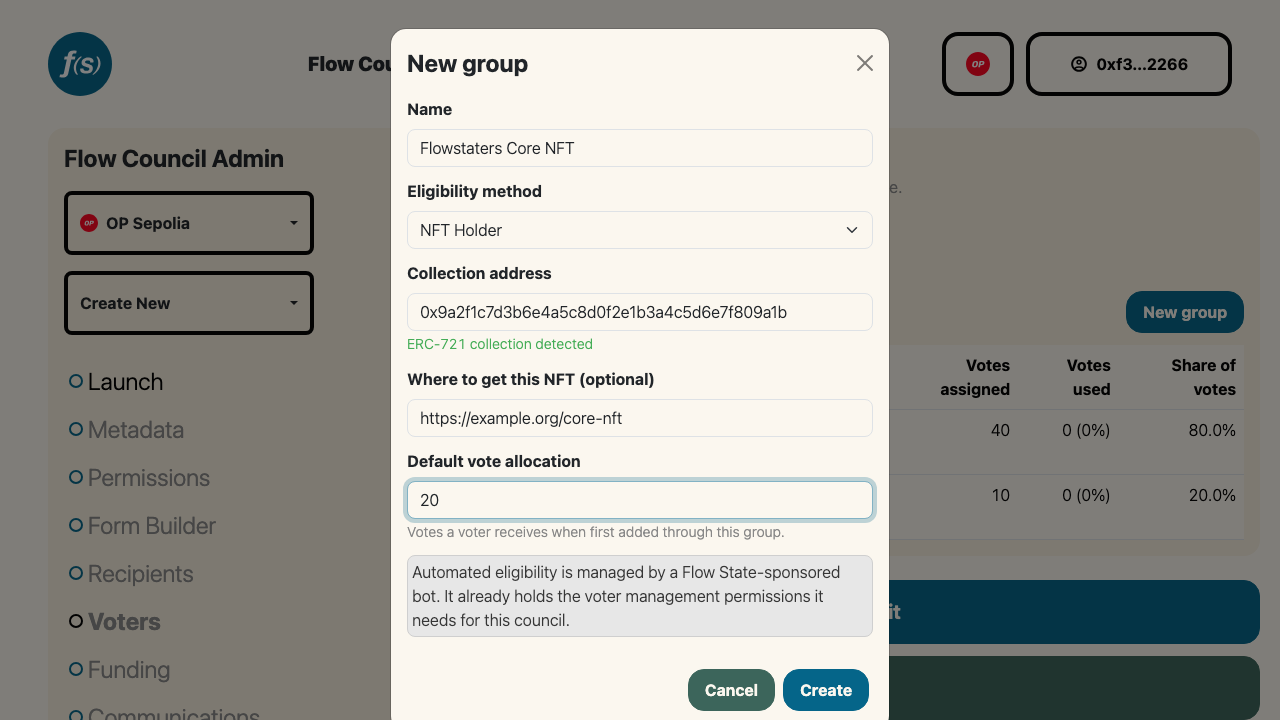
Creating an NFT Holder group: paste the collection address, and the token standard is detected for you.
Setup
- On the Membership page, click New group and select NFT Holder as the eligibility method.
- Paste the collection's contract address. It must be deployed on the same network as the council.
- The standard is detected automatically: you'll see ERC-721 collection detected or ERC-1155 collection detected. For an ERC-1155, a required Token ID field appears, since a 1155 contract holds many tokens and only one of them counts.
- Optionally add Where to get this NFT, a mint page or marketplace link. Voters who don't hold the NFT see it as a Get this NFT link in the eligibility popup.
- Set the Default vote allocation, the number of votes a holder receives. The group name defaults to the detected collection name (or a shortened contract address when the contract exposes no name); edit it freely, it's what voters see.
- Click Create. Like GoodDollar groups, an NFT group needs the Flow State–sponsored bot to hold the Voter Review role, so the first NFT (or GoodDollar) group on a council triggers a one-time grant transaction.
Tiering with several groups
A council can have several NFT groups, which is how you tier membership: a core contributor NFT worth 20 votes alongside a community NFT worth 5. When a wallet holds NFTs matching more than one group, it receives the highest single allocation, never the sum, and lands in exactly one group. Ties go to the group created first.
Two groups on the same council can't point at the same collection and token ID, so tiering happens across distinct collections (or distinct token IDs within one ERC-1155).
Editing
The contract address, token ID, vote allocation, name, and link can be changed at any time, including after the group has members. Changing the address or token ID shows a warning, because existing members keep the votes they already have and are not re-checked: use the voter table to remove anyone who no longer qualifies. The eligibility method is locked once the group has members.
Constraints
- A council uses one automated method or the other: GoodDollar and NFT Holder cannot coexist on the same council. Whichever you configure first disables the other in the eligibility dropdown, with the reason shown inline.
- The collection must be on the council's chain. Cross-chain gating is not supported.
- Holding one NFT is the same as holding fifty. There are no balance thresholds and votes don't scale with the number held.
- Holders claim their own votes. There's no way to bulk-import everyone who holds a collection.
Eligibility is a gate at entry, not an ongoing condition. Selling or transferring the NFT does not revoke voting power that was already granted. To remove someone, zero out their votes in the voter table.
A few older collections don't expose their standard in a machine-readable way. When detection is inconclusive you can pick ERC-721 or ERC-1155 yourself, and the contract is still structurally verified before it's accepted, so an ordinary token contract can never be saved as a collection ("This looks like a token contract, not an NFT collection").
For the voter's side of this, see Voting. For the endpoints, the claim signature, and the refusal codes, see NFT Eligibility API in the developer docs.
Metrics groups
A metrics group delegates a configurable share of a council's allocation to an automated data-driven policy. It adds the F(S) Automation Bot as a plain on-chain voter with an admin-set voting power equal to the share you want the policy to control. The bot requires no special role; it only casts its own ballot.
An external caller (a Dune query, cron job, or any HTTP client) then pushes allocation decisions by POSTing relative weights to an authenticated endpoint using a per-council API key. The platform normalizes those weights to the bot's current on-chain voting power and submits the ballot on-chain. Scoring and ranking logic live entirely in the caller; the platform ingests the weights and handles the on-chain mechanics.
When to use it: when you want part of the council's allocation to follow an objective, automatable signal, for example onchain activity metrics, contribution data from a dashboard, or any policy you can express as a ranked list of recipients.
Setup
- On the Membership page, click New group and select Metrics as the eligibility method.
- Set the Vote power (the total number of votes the bot can spread across recipients). This is the share of the council's allocation controlled by the automated policy.
- Click Create. One wallet transaction adds the bot as a voter with that voting power.
- Open the group detail page. In the Metrics API panel, enter a label and click Create key. Copy the token immediately. It is shown once and not stored in plaintext.
Key management
The Metrics API panel lists all keys for the council, identified by label and a short prefix. Keys show their last-used date. To deactivate automated voting, click Revoke next to any key. Revoked keys are rejected immediately and cannot be reinstated. Mint a new key to resume.
Editing vote power
To change the share of the allocation the bot controls, open the group detail, click the edit icon, update Vote power, and click Save. Changing vote power submits an on-chain transaction.
Constraints
- A council may have at most one metrics group.
- The eligibility method of a metrics group is locked after creation.
- The bot needs no role beyond being a voter; no role grant is required during setup.
For the request format and response codes, see Metrics API in the developer docs.
An address belongs to one group per council. Adding an address that already votes in another group of the same council is skipped rather than duplicated.